1. Introduction
SSH
(Secure Shell) is a secure network protocol used to remotely connect to
another computer over an unsecured network.It encrypts all communication
between the client and server, preventing hackers from reading
passwords or data.
SSH is commonly used by:
- Linux Administrators
- DevOps Engineers
- Cloud Engineers
- Developers
- System Administrators
- Security Engineers
22/TCP2.Why People use SSH
SSH allows users to
- Login remotely
- Execute commands
- Transfer files
- Manage servers
- Forward ports
- Create encrypted tunnels
Without SSH
User -------- Password -------- ServerPassword travels in plain text.
With SSH
User === Encrypted Data === ServerEverything is encrypted.
Benefits
- Secure Login
- Remote Administration
- Secure File Transfer
- Data Encryption
- Authentication
- Port Forwarding
4. SSH Architecture
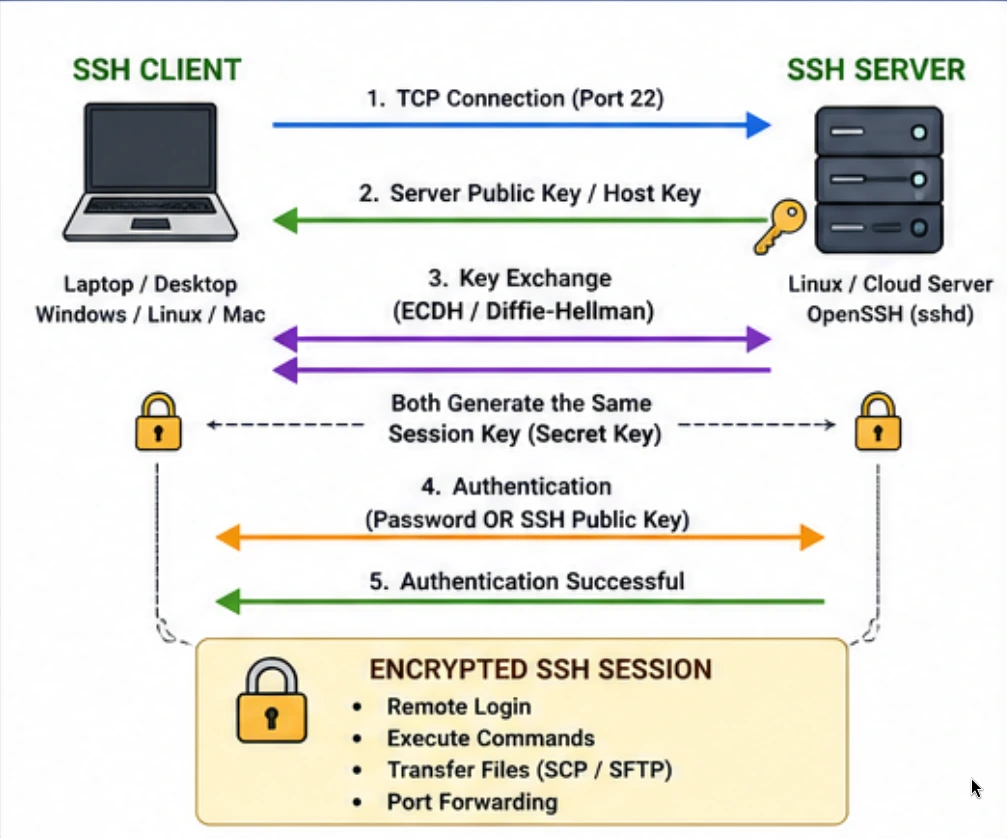
5.SSH Key Exchange Flow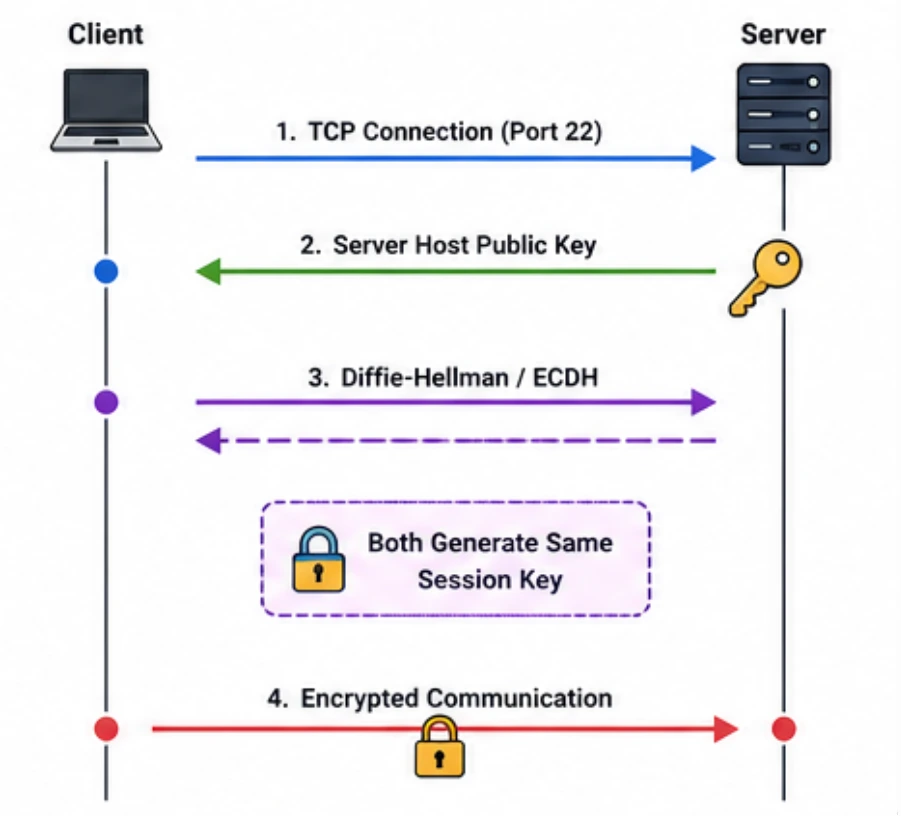
6.SSH Public Key Authentication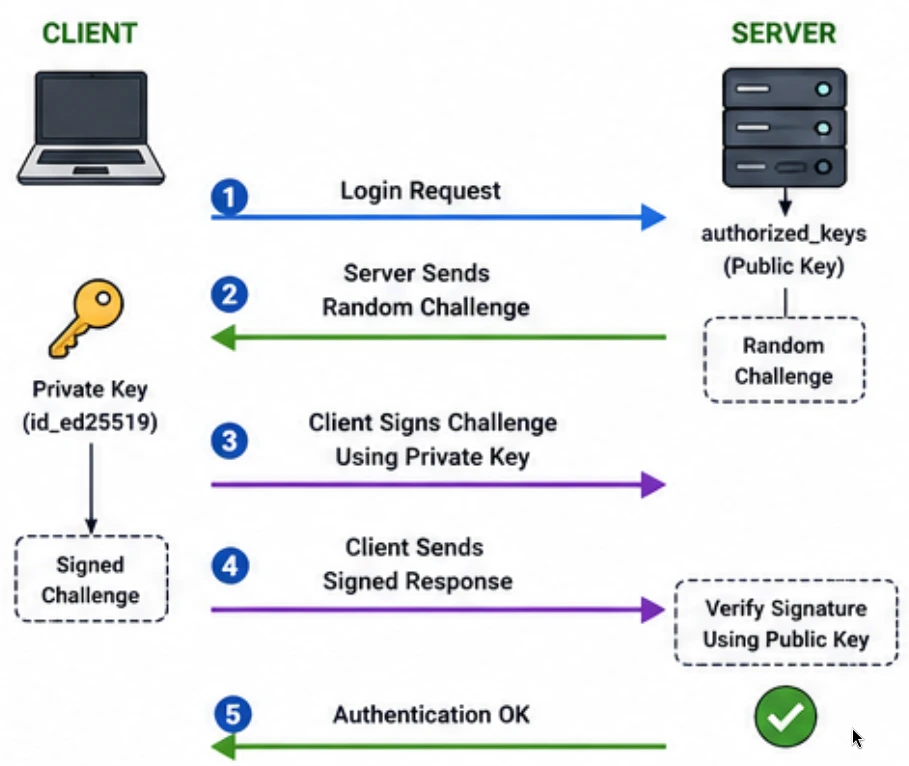
7.SSH Components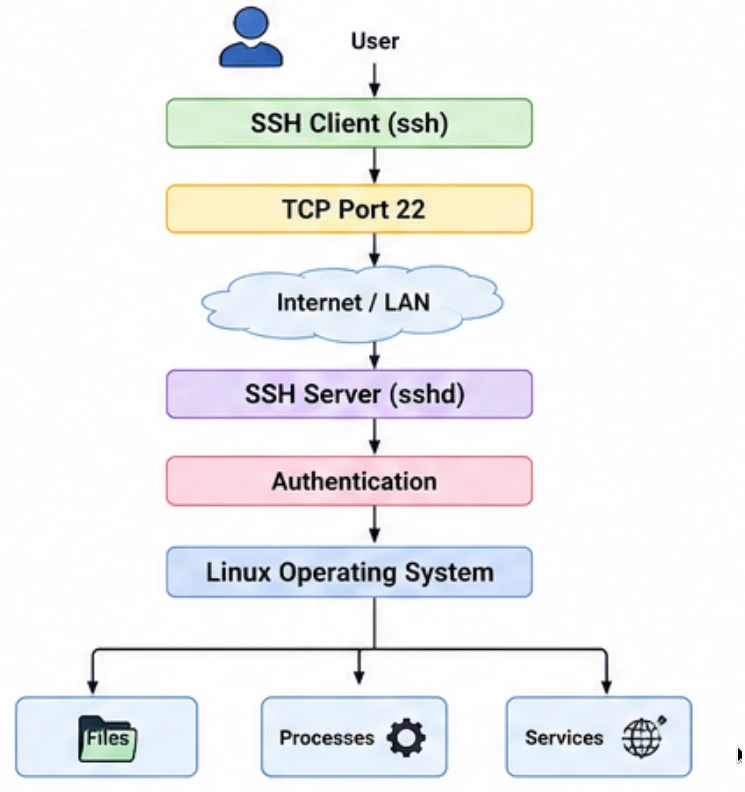
8.Complete SSH Workflow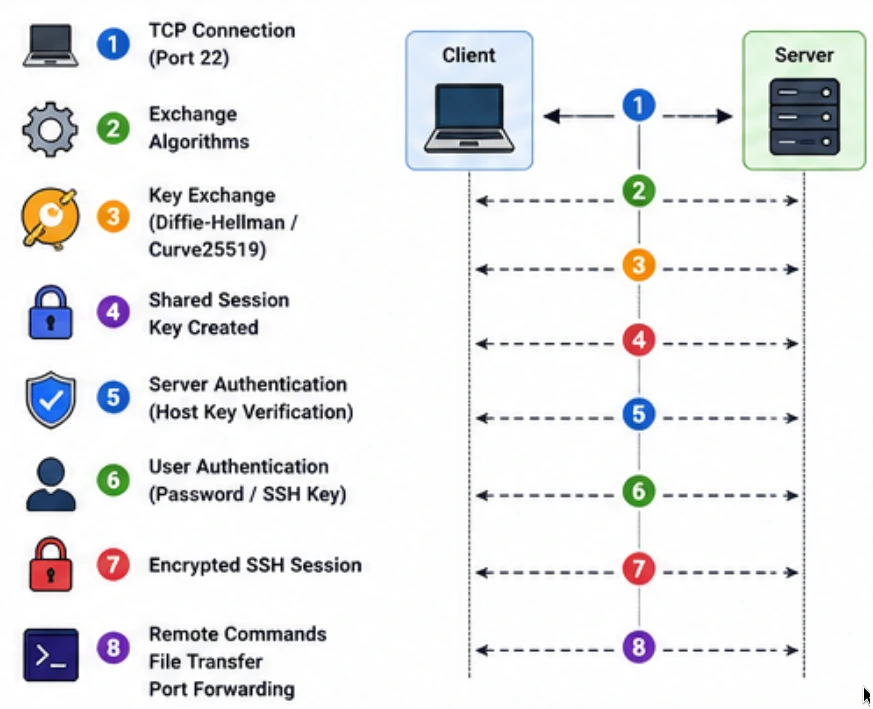
9. SSH Encryption
Symmetric encryption uses the exact same secret key
to both lock (encrypt) and unlock (decrypt) the data. Because both your
local computer and the remote server share this identical key, the
encryption process is incredibly fast.
Examples: AES-128, AES-192, AES-256, ChaCha20
Asymmetric encryption is a security method that uses two different, mathematically linked keys to protect data: a Public Key and a Private Key.
1. The Public Key (The Lock)
This
key is completely open to the world. Anyone can use it to scramble
(encrypt) a message. However, once the data is locked with this public
key, it cannot be unlocked by the public key again.
2. The Private Key (The Secret Key)
This
key is kept strictly secret by the owner. It is the only key capable of
unscrambling (decrypting) the data locked by the corresponding public
key.
Example: RSA, ECDSA, ED25519
Generate Key
ssh-keygenOutput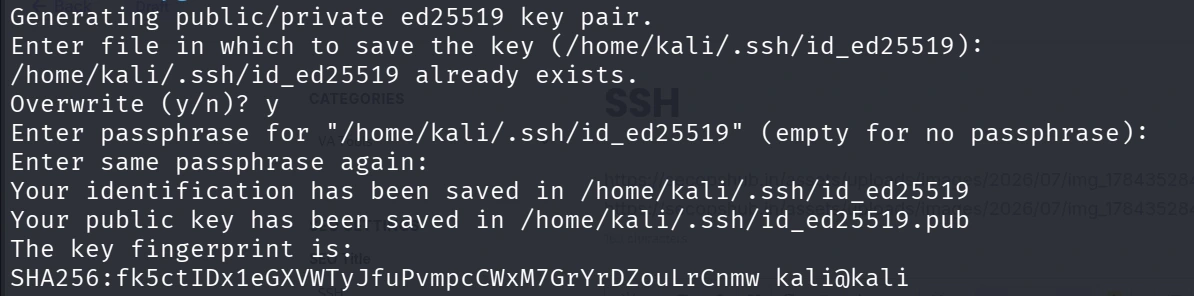
Note: kali
is a username of linux system and when enter the upper command then
will ask the file name but you can simply click on Enter
10. SSH Directory Structure

id_ed25519: Your strictly secret private key used to prove your identity.id_ed25519.pub: Your public key that you copy to remote servers so they recognize you.known_hosts: A list of fingerprints from servers you trust to prevent connection tampering.known_hosts.old: The automatically generated backup of your trusted servers list.authorized_keys: A list of public keys belonging to other users allowed to log into your machine.agent: A temporary background background process file that holds your active keys to skip typing passphrases.11. Most Important SSH Commands
Connect
ssh username@hostname OR ssh ubuntu@192.168.1.100Connect using Port
ssh -p 2222 user@serverConnect using Private Key
ssh -i private-key user@serverExecute Command
ssh user@server "ls -l"Copy Public Key
ssh-copy-id user@serverNote: After this command ssh will not ask you to provide password of this server
Generate RSA Key
ssh-keygen -t rsa -b 4096Generate ED25519 Key
ssh-keygen -t ed25519Remove Known Host
ssh-keygen -R hostnameVerbose Mode
ssh -v user@serverSimple Verbose
ssh -vv user@serverMore verbose
ssh -vvv user@serverMaximum debugging
12. Port Forwarding
SSH Port Forwarding
(also called SSH Tunneling) lets you securely route network traffic
through an existing SSH connection. It wraps normal network traffic
inside a secure, encrypted SSH tunnel.
Local Port Forwarding
Lets you access a service running on the remote server (or its network) using a port on your local machine.
ssh -L 8080:localhost:80 user@serverRemote Port Forwarding
The exact opposite. It lets the remote server access a service running on your local machine.
ssh -R 9090:localhost:80 user@serverDynamic SOCKS Proxy
Turns the SSH connection into a private VPN/SOCKS proxy.
ssh -D 1080 user@serverDisable Password Authentication
ssh -o PasswordAuthentication=no user@server13. SCP Commands
SCP (Secure Copy Protocol) is a command-line tool used to securely copy files and directories between computers over a network.It uses SSH under the hood, meaning the file transfer is fully encrypted and uses the exact same keys and passwords as your normal SSH connections.
Copy file to server
scp file.txt user@server:/home/user/Copy folder
scp -r folder user@server:/home/user/Download file
scp user@server:/tmp/file.txt .Use custom port
scp -P 2222 file.txt user@server:/home/user/14. SSH Server Configuration
Location
/etc/ssh/sshd_config
Important Settings
Port 22: Sets the network port the SSH server listens on for incoming connections.PermitRootLogin no: Blocks the highly targetedroot(admin) account from logging in directly over SSH.
PasswordAuthentication no: Disables standard text passwords to eliminate the risk of brute-force guessing attacks.PubkeyAuthentication yes: Enables secure cryptographic SSH key pairs as the mandatory way to log in.MaxAuthTries 3: Disconnects the session if a user fails to log in successfully within three attempts.ClientAliveInterval 300: Forces the server to check if the user is still there every 5 minutes (300 seconds) during inactivity.ClientAliveCountMax 2: Drops the connection if the user's computer fails to respond to two active checks in a row.15. SSH Service Commands
Ubuntu / Debian Based linux
sudo systemctl status ssh
sudo systemctl start ssh
sudo systemctl stop ssh
sudo systemctl restart ssh
sudo systemctl enable ssh
RHEL / Fedora
sudo systemctl status sshd
sudo systemctl start sshd
sudo systemctl stop sshd
sudo systemctl restart sshd
sudo systemctl enable sshd
17. Common Troubleshooting
| Problem | Possible Cause | Solution |
|---|---|---|
| Connection refused | SSH service stopped | sudo systemctl start ssh |
| Permission denied | Wrong key/password | Verify keys and permissions 400 |
| Host key changed | Server reinstalled | ssh-keygen -R hostname |
| Timeout | Firewall/network issue | Check firewall and connectivity |
| No route to host | Network unreachable | Verify IP address and routing |
18.SSH vs Telnet Overview
| Feature | SSH (Secure Shell) | Telnet |
|---|---|---|
| Full Form | Secure Shell | Telecommunication Network |
| Security | ✅ Encrypted | ❌ Not Encrypted |
| Default Port | 22 | 23 |
| Authentication | Password, Public Key, MFA | Username & Password |
| Data Encryption | AES, ChaCha20, etc. | None |
| Password Protection | Encrypted | Plain Text |
| File Transfer | SCP, SFTP | Not Supported |
| Remote Command Execution | Yes | Yes |
| Integrity Check | Yes | No |
| Compression | Yes | No |
| Port Forwarding | Yes | No |
| X11 Forwarding | Yes | No |
| Public Key Authentication | Yes | No |
| Recommended Today | ✅ Yes | ❌ No |
19. Conclusion
SSH is one of the most essential tools for Linux administration, DevOps, cloud computing, and cybersecurity. It provides encrypted remote access, secure file transfer, and advanced capabilities such as port forwarding and tunneling. Mastering SSH commands, key management, configuration, and security best practices is fundamental for anyone managing Linux systems or cloud infrastructure.
No comments yet. Be the first to comment!